
12 Signs Your Business Has Outgrown Google Drive (And Needs a Document Management System)
Updated: Sep 7

Google Drive Isn't the Problem - Growth Is
Google Drive has become the default collaboration platform for businesses around the world. It enables teams to share files, collaborate in real time, and work from anywhere. For startups and growing businesses, it's often exactly the right solution.
But growth changes the rules.
It rarely happens overnight. One day, a contract takes twenty minutes to find. A week later, Finance and Sales are working from different versions of the same proposal. HR discovers a confidential folder was shared more broadly than intended. Approvals disappear into email chains. None of these problems happen because Google Drive is failing—they happen because your business has become more complex.
What Changes as Organizations Grow?
As document volumes increase, storing files is no longer enough. Documents become business assets that require governance, security, traceability, and structured workflows. Growing organizations stop asking, 'Where is the file?' and start asking much more important questions:
Who approved this document?
Which version is the latest?
Who can access confidential information?
Can we retrieve this contract in seconds during an audit?
Can we automate approvals instead of chasing emails?
Those questions mark the transition from file storage to enterprise document management.
If you're evaluating whether shared drives are still enough for your business, you may also find our guide on Shared Drive vs Document Management System for the Healthcare Industry useful. Although it focuses on healthcare, the challenges around version control, compliance, collaboration, and document governance apply to organizations across industries.
Before looking at the warning signs, it's worth understanding what separates file storage from enterprise document management.
An Enterprise Document Management System (DMS) is a centralized platform that securely stores, organizes, retrieves, governs, and automates business documents throughout their lifecycle. Unlike shared drives, it combines version control, OCR, metadata, workflow automation, audit trails, enterprise search, and role-based permissions to help organizations manage information at scale.
Reality Check
If your team spends more time looking for documents than making decisions with them, the challenge isn't storage; it's document management.
Sign 1 - Lost Time Isn't the Real Problem

Imagine This
It's 4:45 PM on a Friday. Your biggest customer requests the signed version of last year's contract. Everyone knows it exists, yet twenty minutes later, Legal is searching Google Drive, Sales is checking email attachments, and Operations has a downloaded copy that may or may not be current.
Shared drives make saving documents easy, but they don't enforce consistent organization. As teams grow, folder structures become inconsistent, naming conventions drift, and finding information depends on remembering where someone else stored it.
Document Management Software allows employees to search by customer name, invoice number, project, metadata, or even text inside scanned documents using OCR and AI-powered search. Information becomes searchable instead of simply stored.
The value of fast document retrieval grows with your business. Saving a few minutes per employee each day quickly turns into hundreds of productive hours every year.
Sign 2 - Version Chaos

You've Probably Seen This
Proposal.docxProposal_Final.docx
Proposal_Final_v2.docx
Proposal_Final_v3_FINAL.docx
Proposal_Final_v3_FINAL_NEW.docx
When multiple teams edit documents independently, every department creates its own 'latest' version. Eventually, confidence in the document is lost.
A modern DMS maintains a single source of truth while preserving every historical revision. Teams always know which document is approved without losing previous versions.
Version control isn't just about organization; it prevents costly mistakes and protects customer trust.
Sign 3 - Approval Bottlenecks

Where the Process Breaks Down
Purchase Request → Reporting Manager→ Procurement → Finance → Legal → Approved → Vendor.
If one person forgets to forward an email, the entire process slows down.
Email was never designed to be a workflow engine. As approvals increase, visibility disappears.
Workflow automation routes documents automatically, notifies the next approver, records every action, and provides a complete audit trail.
The best workflows depend on systems—not on people remembering the next step.
Sign 4 - Permission Sprawl

Ask Yourself This
If an employee left your organization today, could you confidently identify every confidential document they can still access?
As organizations expand, manually managing permissions becomes difficult and risky, particularly for HR, Finance, Legal, and executive documents.
Role-based access control allows administrators to assign permissions by department, role, or project while maintaining complete visibility over who accessed what and when.
Security isn't just about preventing external threats. It's also about ensuring the right people have access to the right information at the right time.
When Productivity Problems Become Business Risks
The first four signs are usually frustrating but manageable. Teams lose time searching for documents, approvals take longer than they should, and version confusion becomes part of everyday work. The next stage is different. Document challenges stop affecting individual employees and begin affecting the business itself.
When security, compliance, collaboration, and governance become recurring concerns, document management is no longer an operational issue; it becomes a business capability.
Sign 5 - Audit Day Shouldn't Feel Like a Fire Drill

Imagine Audit Day
An auditor asks for the approval history of a policy updated two years ago. The document is easy enough to find, but who approved it? Which version was active? Who accessed it? Suddenly, multiple teams are searching emails, shared folders, and archived files.
Shared drives store documents, but they don't automatically capture the context around them. As compliance requirements grow, businesses need more than files; they need evidence.
An Enterprise Document Management System maintains version history, audit trails, approval records, retention policies, and searchable metadata so evidence is available when it's needed rather than reconstructed later.
The best audit is the one your team doesn't have to prepare for because the information is already organized.
Sign 6 - Hybrid Teams Start Working in Different Realities

Consider This
Your sales team updates a proposal from New York. Finance reviews an older copy from another office. Operations downloads a PDF, while Legal comments on a separate version. Everyone is working hard, but not everyone is working on the same document.
Hybrid work makes collaboration easier, but it also increases the number of copies, downloads, and disconnected document versions.
A cloud-based Enterprise DMS gives every authorized employee access to the latest approved document while preserving version history. Teams collaborate from a single source of truth rather than multiple local copies.
Better collaboration isn't about giving everyone access to every document. It's about ensuring every authorized employee works from the same trusted version.
Sign 7 — Your Documents Exist, but Your Knowledge Doesn't

The Hidden Cost Nobody Measures
Most organizations don't lose documents; they lose the ability to find and reuse the knowledge inside them. Employees recreate proposals, policies, and reports simply because nobody can locate the originals.
Folder structures reflect how documents were stored, not how people search. As repositories grow, valuable information becomes buried.
AI-powered search, OCR, metadata, document classification, and intelligent indexing transform thousands of files into searchable business knowledge.
The value of a document isn't that it exists. It's that the right person can find it at the right moment.
Sign 8 - Processes Depend on Memory Instead of Systems

Reality Check
If approvals only move forward because someone sends a reminder or follows up in a chat, your workflow depends on people rather than process.
Manual follow-ups create delays, inconsistent experiences, and unnecessary administrative work. As organizations scale, these small delays multiply across departments.
Workflow automation routes documents automatically, notifies approvers, escalates overdue tasks, and records every action in an audit trail. Employees spend less time coordinating work and more time completing it.
Scalable businesses build processes that continue working even when people are busy.
We've explored this topic in greater detail in our guide, Unlocking Business Efficiency: The Imperative of Modern Document Management Systems, which explores how automation, collaboration, and document governance improve day-to-day operations.
Knowing When It's Time to Move Forward
By now, you've probably recognized at least a few of these challenges. That doesn't mean Google Drive has stopped being a good product. It means your business may have reached the point where collaboration alone is no longer enough. The conversation shifts from storing files to governing information.
Sign 9 — One Document, Three 'Latest Versions'

You've Seen This Before
Marketing updates the brochure. Sales edits a copy for a prospect. Customer Success downloads another version for onboarding. A month later, nobody knows which document is actually approved.
Inconsistent documents create inconsistent decisions. Customers receive different information, employees duplicate work, and confidence in shared knowledge slowly disappears.
Document Management Software maintains a single source of truth while preserving every historical revision. Teams collaborate on controlled documents instead of uncontrolled copies.
The goal isn't fewer files. It's one trusted version everyone can rely on.
Sign 10 - Death by a Thousand Clicks

Look Beyond the Obvious
Searching folders. Renaming files. Chasing approvals. Checking permissions. Downloading attachments. None of these tasks feels significant on its own, but together they consume hours every week.
As organizations grow, document administration quietly becomes part of everyone's job.
A Better Way to Work
Workflow automation, metadata, templates, intelligent search, and standardized processes remove repetitive administration, so employees spend more time making decisions and less time managing documents.
Operational efficiency rarely comes from one dramatic improvement. It comes from removing hundreds of small inefficiencies.
Sign 11 - Growth Changed the Rules
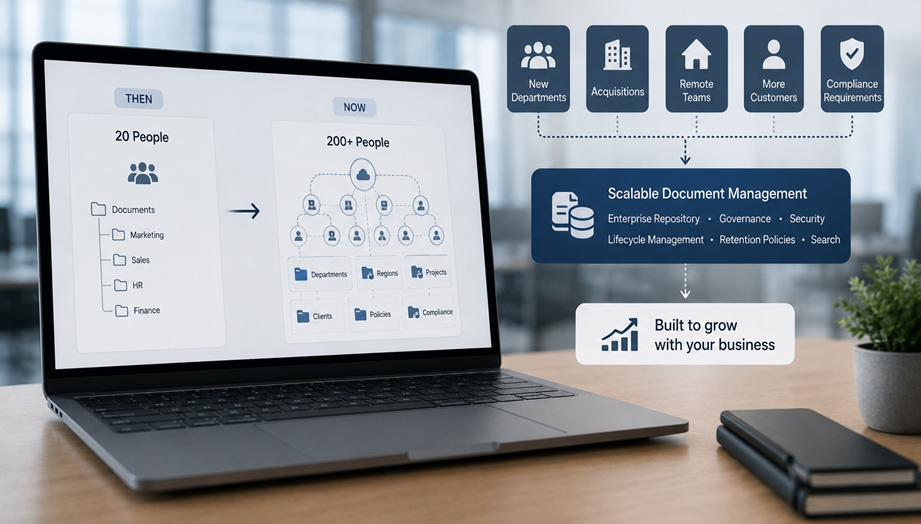
A Business That's Growing Shouldn't Feel Harder to Manage
New departments, acquisitions, remote teams, customers, and compliance requirements all increase document complexity. Processes that worked for a 20-person business rarely scale to 200 people.
The problem isn't growth—it's expecting yesterday's document processes to support tomorrow's business.
Enterprise repositories, lifecycle management, retention policies, enterprise search, and governance provide a scalable foundation that grows with the organization.
Healthy growth deserves document processes designed to grow with it.
Sign 12 - You've Already Started Looking for Something Better

One Final Question
If you've searched for 'best document management software', 'enterprise DMS', or 'Google Drive alternatives', are you really looking for another storage platform—or are you looking for a better way to run your business?
Organizations rarely evaluate enterprise software out of curiosity. They do it because existing processes are slowing people down.
Choosing an Enterprise Document Management System isn't about replacing Google Drive. It's about adding governance, automation, compliance, security, and visibility that shared drives were never intended to provide.
The best time to evaluate document management software is before document chaos begins affecting customers, employees, and business performance.
Google Drive vs Enterprise Document Management Software
Business Need | Shared Drive | Enterprise DMS |
Finding an old contract | Search folders manually | Search by metadata, OCR, or document content |
Approving a purchase order | Email chains | Automated workflow with audit trail |
Employee leaves | Review permissions manually | Revoke role-based access instantly |
Compliance audit | Gather evidence manually | Complete history available |
Working across offices | Multiple copies | Single source of truth |
The goal isn't to replace a collaboration platform. It's to complement it with the governance, automation, and control that growing businesses eventually need.
Is Google Drive Still the Right Choice?
Absolutely—for many organizations. If your team is small, collaboration is straightforward, compliance requirements are limited, and document approval processes are simple, Google Drive remains an excellent solution. Enterprise document management becomes valuable when governance, security, traceability, and automation become business priorities.
A Quick Self‑Assessment
Finding important documents takes longer than it should.
Different departments work from different versions.
Approvals depend on email or chat reminders.
Permissions are difficult to manage consistently.
Compliance and audits require manual preparation.
Knowledge is difficult to reuse across teams.
If you checked four or more, your organization has likely reached the stage where evaluating Enterprise Document Management Software makes business sense.
Many organizations continue using cloud storage for collaboration while adopting a document management platform for governance, compliance, and workflow automation. If you're evaluating this approach, our article The Shift to Cloud Document Management: What It Means for Remote Work and Global Collaboration explores how cloud-based document management supports growing and distributed businesses.
Conclusion
Every growing organization reaches a point where document management becomes more than storage. It becomes a strategic capability that influences productivity, compliance, customer service, and business resilience. The organizations that recognize this transition early spend less time searching for information and more time creating value from it.
Organizations that invest in structured document management before information becomes chaotic often spend less time fixing operational problems and more time serving customers, supporting employees, and growing the business.
How EisenVault Can Help
If your organization has identified several of the challenges discussed in this guide, it may be time to evaluate whether your current approach will continue to support your business over the next few years. EisenVault's Cloud & Enterprise Document Management Software helps organizations centralize business documents, automate workflows, strengthen compliance, improve collaboration, and maintain complete visibility over critical information. Whether you're modernizing existing processes or planning for future growth, EisenVault provides the structure needed to manage documents with confidence.
Frequently Asked Questions
Can Google Drive replace an Enterprise Document Management System?
Google Drive is excellent for collaboration, but organizations with governance, compliance, workflow, and audit requirements often benefit from a dedicated Enterprise DMS.
Can we migrate gradually?
Yes. Many organizations implement an Enterprise DMS in phases while allowing teams to continue using familiar collaboration tools during the transition.
Which businesses benefit most?
Manufacturing, healthcare, legal, finance, education, HR, and any organization managing high volumes of business-critical documents typically see the greatest value.
How is an Enterprise Document Management System different from cloud storage?
Cloud storage platforms like Google Drive and Dropbox are designed primarily for file storage and collaboration. An Enterprise Document Management System goes further by adding document governance, workflow automation, version control, audit trails, metadata, enterprise search, retention policies, and role-based security. These capabilities help organizations manage documents throughout their entire lifecycle rather than simply storing them.


Comments